

Finally, we’re on the last month of the year, and it’s time for a 2020 look back!
Many of us stayed at home and streamed a lot of music as one of our go-to activities, and for the nine months under lockdown, Spotify has been a solace for many Filipinos amid the pandemic.
(Read: Spotify users might not aware of these yet, Here are some secret hacks you all should know!)
Our countless hours of music on Spotify has indeed become part of our daily lives, and as we all nearing to close our another year in a month, the biggest music streaming site has launched its “Spotify Wrapped 2020” where you can see which songs, artists, and podcasts you listened to most over the past year.
Here’s how to find your Spotify Wrapped 2020
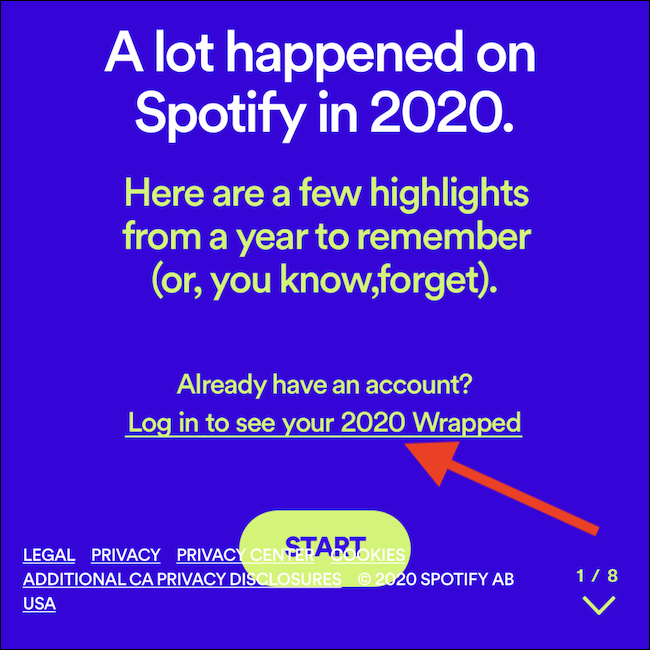
Open Spotify app on iPhone, iPad, or Android, or head on over to Spotify’s Wrapped 2020 website using a browser on your phone or tablet such as Google Chrome.
From the browser, tap the “Log in to see your 2020 Wrapped” link.
You will either be redirected to a login screen or directed immediately into the Spotify app.
At the top of the “Home” tab, ‘Wrapped 2020’ will be highlighted.
Tap on the card to view your end-of-year results.
Then, an Instagram Story-like interface will automatically start playing music and a video.
Tap on the right or left side of your screen to process forward or backward through your Spotify Wrapped 2020.
There you have it, after checking out you top artists, songs, and podcasts of the year, you can share it to your social media accounts, just select the “Share This Story” link found under each card.

The 2020 version of Spotify Wrapped is now live for most users and you can find your curated playlist on the Spotify App and online. This is a quick wrap-up to help guide you through the process.
Yas, go and check out your year-long music streaming and listen to it one more time.
Related Reads
What's New
More Articles


